分享 show history for selection lines in Zed

相信使用过 JetBrains 产品的用户,对内置的 Git 操作都会觉得很方便。其中很重要的一个功能:选中某几行代码,鼠标右键,使用 show history for selection。就能展示出这几行代码的 git 提交历史记录,这个功能真的太香了。
这个功能在很多编辑器上都不支持,我目前在使用 Zed 编辑器,最开始对 Git 操作支持很少,我都是使用 lazygit 来操作,但上面提到的功能无法实现。所以我就尝试编写脚本去实现这个功能。本质上就是使用 git 原生命令行操作:git log -L <range:file> 。将内容输出到一个临时文件中,然后通过 zed 编辑器打开它,同时使用 diff 语法展示高亮信息。
效果展示:
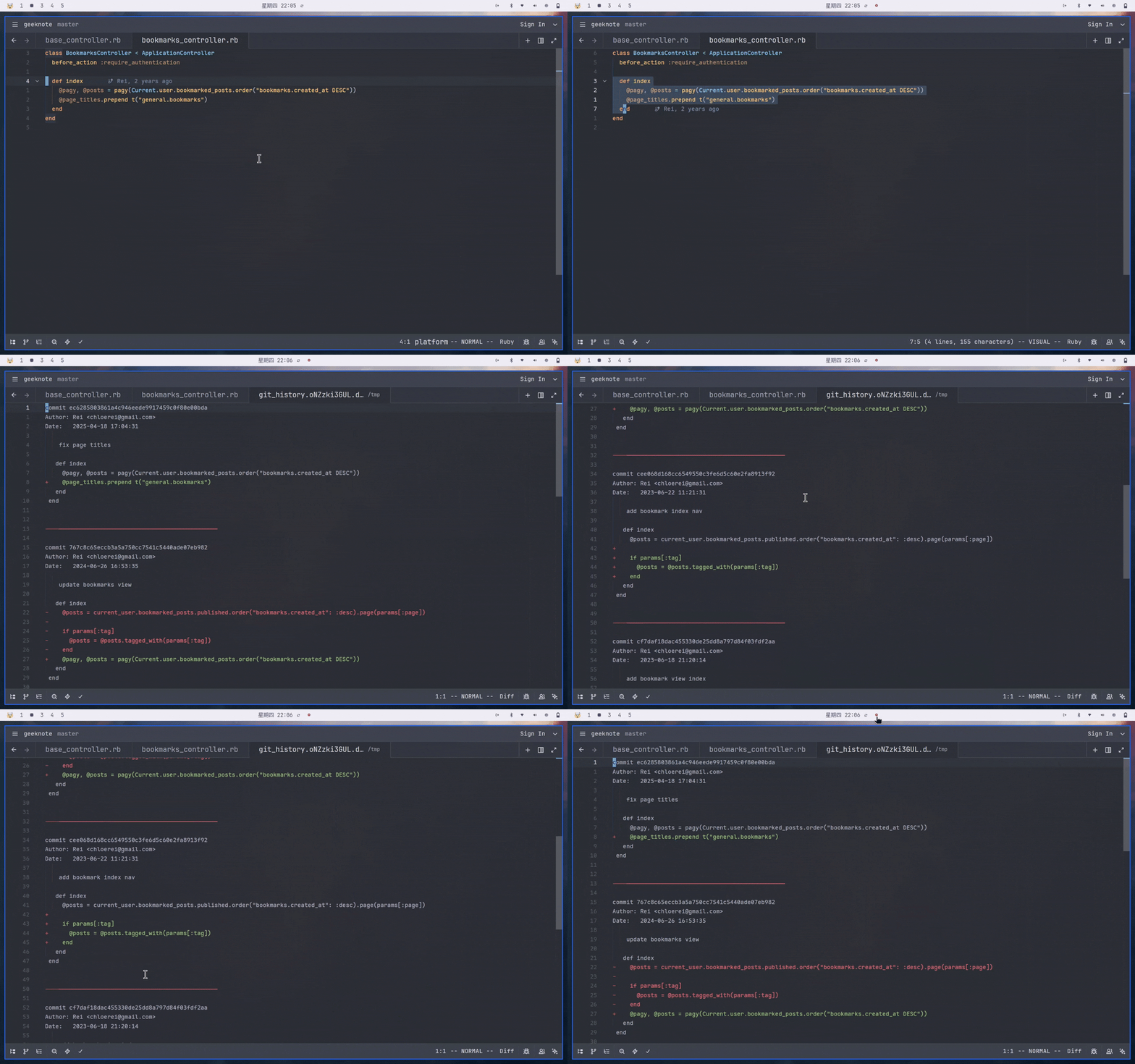
Fish 代码
function git_line_history --description "Show git history for specific lines in a file"
    # Validate argument count
    if test (count $argv) -ne 3
        echo "Usage: git_line_history <file_path> <start_line> <end_line>"
        return 1
    end

    set -l file_path $argv[1]
    set -l start_line $argv[2]
    set -l end_line $argv[3]

    # Verify the file exists
    if not test -f "$file_path"
        echo "Error: file '$file_path' does not exist"
        return 1
    end

    # Verify we are inside a git repository
    if not git rev-parse --is-inside-work-tree >/dev/null 2>&1
        echo "Error: current directory is not inside a git repository"
        return 1
    end

    # Create temporary files
    set -l temp_file (mktemp -t git_history.XXXXXXXXXX.diff)
    set -l raw_log_file (mktemp -t git_history.XXXXXXXXXX.raw)

    # Build the line range argument for git log -L
    set -l line_range "$start_line,$end_line:$file_path"

    # Fetch the line history
    git log --date=format:'%Y-%m-%d %H:%M:%S' -L $line_range >$raw_log_file 2>&1

    if test $status -ne 0
        echo "Error: failed to execute git log"
        if test -s $raw_log_file
            echo "Details:"
            cat $raw_log_file
        end
        rm -f $raw_log_file $temp_file
        return 1
    end

    # Process output: filter diff metadata and add separators between commits
    awk '
    BEGIN { in_commit = 0; has_content = 0; }
    /^commit / {
        if (in_commit && has_content) print "\n--------------------------------------------------\n"
        in_commit = 1
        has_content = 1
        print
        next
    }
    /^diff --git|^index |^--- a\/|^\+\+\+ b\/|^@@ .* @@/ { next }
    {
        if (in_commit) print
        has_content = 1
    }
    ' $raw_log_file >$temp_file

    rm -f $raw_log_file

    # Check if the result is empty
    if not test -s $temp_file
        echo "Note: no matching commit history found"
        rm -f $temp_file
        return 0
    end

    # Choose an editor: prefer zeditor (Arch Linux), fall back to subl, then $EDITOR
    set -l editor_cmd
    if command -q zeditor
        set editor_cmd zeditor
    else if command -q zed
        set editor_cmd zed
    else if command -q subl
        set editor_cmd subl
    else if set -q EDITOR
        set editor_cmd $EDITOR
    else
        echo "Error: no suitable editor found"
        echo "Temporary file location: $temp_file"
        return 1
    end

    $editor_cmd "$temp_file"

    # Clean up old temporary files from previous runs
    function cleanup_git_history --on-event fish_exit
        # Clean up old temporary files from previous runs
        set -l tmpdir (dirname (mktemp -u))
        rm -f $tmpdir/git_history.*.diff 2>/dev/null
        rm -f $tmpdir/git_history.*.raw 2>/dev/null
    end

    return 0
end
function zed_git_line_history --description "Zed editor wrapper for git_line_history"
    # Extract line range from Zed environment variables
    set -l start_line $ZED_ROW
    set -l selection "$ZED_SELECTED_TEXT"
    set -l line_count (printf '%s\n' "$selection" | wc -l | string trim)
    set -l end_line (math $start_line + $line_count - 1)
    set -l file_path "$ZED_FILE"

    git_line_history "$file_path" $start_line $end_line
end
Zed 配置
task
{
   "label": "git_line_history",
   "command": "zed_git_line_history",
   "env": {
     "ZED_ROW": "$ZED_ROW",
     "ZED_SELECTED_TEXT": "$ZED_SELECTED_TEXT",
     "ZED_FILE": "$ZED_FILE"
   },
   "hide": "always",
   "allow_concurrent_runs": true,
   "use_new_terminal": true
 },
keymap
{
  "context": "vim_mode == normal || vim_mode == visual",
  "bindings": {
      "g h": ["task::Spawn", { "task_name": "git_line_history" }],
   }
}
暂无回复。